
Money Clarity

    How to track UPI spending across GPay, PhonePe and Paytm

    Try this before reading further: write down the ten largest UPI payments you made last month. Most people can, roughly, because a ₹1,400 restaurant bill leaves a mark. Now try the next ten. Somewhere around payment fifteen the list goes blank, and that is the whole problem in one exercise. In a typical month of 90 UPI debits, the ten you remember are about 40 percent of the money and the 80 you do not are 60 percent.

    UPI spending goes untracked not because people are careless but because it is small and frequent, and small-and-frequent is the shape memory handles worst. A ₹121 payment does not register as a decision. Ninety of them in a month is ₹16,200 on a ₹40,000 salary. Any method that depends on you noticing a payment at the time fails on the majority of the money, because the majority of the money is in the payments you did not notice.

    This page works through one illustrative household, then the four ways to track UPI spending: your payment app's analytics, the bank statement, a manual log, and automatic capture from the bank's own alerts. Three see part of the picture. Then what to read once the whole picture exists.

    Last reviewed 2026-10-09

    The shape of UPI spending

    The technique

    The ten you remember are not the money

    People estimate their UPI spend from the payments they can recall, and the recallable payments are the large ones. The large ones are a minority of the total, so the estimate comes out low by more than half, every month.

    Take a salaried person earning ₹40,000 a month who makes 90 UPI debits averaging ₹180. That is ₹16,200, or 40.5 percent of salary, through a channel that produces no receipt anyone keeps. The household is illustrative; the arithmetic is the point, and you can redo it on one month of your own statement.

    Split the 90 payments by size. The ten largest average ₹650 and add up to ₹6,500. The remaining 80 average ₹121 and add up to ₹9,700. So the payments that feel like spending are 40 percent of UPI spend and the ones that feel like nothing are 60 percent. Ask this person what they spend on UPI and they will say something near ₹6,500: not a guess, a faithful report of the part they can see.

    Illustrative monthCountAverageTotalShare
    All UPI debits90₹180₹16,20040.5% of salary
    Ten largest10₹650₹6,50040% of UPI spend
    Remaining80₹121₹9,70060% of UPI spend
    Salary ₹40,000. Round figures typical of a salaried urban household, not a survey result. Your own split comes from sorting one month of UPI rows on your statement by amount.
    • The 80 small payments are ₹323 a day over three or four moments of two seconds each. There is nothing to remember because nothing happened
    • Underestimating by ₹9,700 a month is not a rounding error on ₹40,000. It is why the month ends tighter than the mental budget said, and why the shortfall never has a name

    Three methods that see part of the picture

    The technique

    All three fail at the same place: the small, unnamed, cross-app payment

    None of the three fails on the ₹1,400 restaurant bill. All three fail on the ₹121 payments that are 60 percent of the money.

    Method one is the spending chart inside your payment app. It is accurate for what it sees, and it sees only that app; most people run two or three. Give the household a 55/35/10 split across three apps: the main app's chart reports ₹8,910 of a real ₹16,200, with a confident category breakdown, and nothing on the screen suggests ₹7,290 is missing. A chart of the wrong total is worse than no chart, because it answers the question and closes it.

    Method two is the bank statement. It is the only complete record, because every UPI debit from every app settles through the same account. Its weakness is naming. A UPI row carries the counterparty's virtual payment address, often a mobile number with a handle, or a registered entity name that looks nothing like the shop sign. Read 90 rows and perhaps 36 are recognisable on sight. The other 54 are amounts with no merchant attached: you can total them, you cannot act on them.

    Method three is logging each payment yourself at the moment you pay. It names everything and sees every app, and works for exactly as long as you keep doing it. Ninety entries at twenty seconds is 30 minutes a month, 360 minutes a year, affordable until it is spread across 90 separate interruptions. It stops in the first busy week, and the month it stops is the month with the most to see.

    MethodSees all appsNames merchantsEffortMisses, in the example
    Payment app analyticsNoYes, its ownNone₹7,290 in the other two apps
    Bank statementYesAbout 36 of 90 rowsReading time54 rows with no usable name
    Manual logYesYes30 min a monthEverything after the first busy week
    App split 55/35/10 of ₹16,200. 36-of-90 is an assumption about how many statement rows carry a readable name; check yours.
    • If you genuinely use one payment app for everything, method one is honest. Most people who think so have a second app for transfers, and the chart does not know that
    • Export the statement once a year regardless: it is the only method that catches a debit you never authorised in any app

    Automatic capture from the bank's own alerts

    The technique

    The alert, not the account

    A tracker that reads the bank's alerts inherits the statement's completeness without the export, and needs no login and no PIN because it never touches the account.

    The fourth method starts from a fact the other three ignore: your bank already tells you about every UPI debit, as it happens, in a message carrying the amount, the date and the counterparty's address. It does this whichever app you paid from, because the app only initiates the payment; the bank executes it and sends the alert. Collect the alerts and you have the statement's coverage with no export and no typing.

    Three things make this tracking rather than a second inbox. It has to read both channels the bank uses, SMS and email, and know that an SMS and an email about the same ₹121 are one payment. It has to need nothing from the account: no bank password, no UPI PIN, no linked login, because reading a notification requires none of those. And it has to solve the naming problem by matching each address against a database of who that address is.

    Unyfy reads your bank and card transaction emails and, on Android, your bank's transactional SMS alerts to log every UPI debit across every payment app with no manual entry and no bank password or UPI PIN, then matches each address against a merchant database of about 10,000 entries and drops any debit it has already seen through the other channel. That is the whole mechanism. SMS reading is on Android. On iPhone, use the web app at app.unyfy.co.in, which reads your bank's email alerts and statements.

    The method sees all 90 payments, and the database turns each address it knows into a merchant name.

    • Coverage comes from the bank, not the app, which is why this is the only method of the four that sees ₹16,200 when the payment app sees ₹8,910

    What to read once it is tracked

    The technique

    Three lists, not one chart

    A category chart says food is a large slice, which you knew. Three lists change behaviour; a pie chart does not.

    A list of 90 rows is a starting point. The month-end review takes fifteen minutes and produces three lists.

    The first is the ten largest payments, named. This is the ₹6,500 you half-knew. Its value is calibration: if the ten largest are ₹6,500 and the total is ₹16,200, your instinct undercounts by ₹9,700, a number worth writing on the wall.

    The second is every UPI AutoPay mandate, the payments that never asked. Four small ones at ₹149, ₹199, ₹299 and ₹99 come to ₹746 a month, 4.6 percent of UPI spend, which feels like nothing. Over a year it is ₹8,952. Each was a decision once, on one day, and has run on that day's reasoning since. The question is not whether it is expensive but whether the reasoning still holds.

    The third is the repeated small payment. The illustrative version is ₹60 twice a working day, a tea and a snack or a short ride each way. Over 22 working days that is ₹2,640 a month and ₹31,680 a year, on nobody's mental list because no single instance is an expense. This is the payment the page is about: the one memory cannot hold and logging cannot sustain, visible only because something counted it 44 times.

    The month-end review, illustrative household
    Ten largest UPI payments, named
    ₹6,500
    Four AutoPay mandates (₹149 + ₹199 + ₹299 + ₹99)
    ₹746 a month, ₹8,952 a year
    ₹60 twice a day, 22 working days
    ₹2,640 a month, ₹31,680 a year
    Cutting 10% of total UPI spend
    ₹1,620 a month, ₹19,440 a year

    The mandate and daily-payment figures show the shape to look for, not a prediction about your account. Ten percent of ₹16,200 is shown as a size of change, not a target.

    • Do the review on the same date each month, after the statement closes, and compare the three lists with last month's. The number that moved is the one worth thought
    • Do not start by cutting the ten largest; they are the payments you chose. Start with the mandates, where the decision may be stale, then the daily repeat, where the decision was never made

    When tracking is not the problem

    Tracking fixes not knowing. It does not fix knowing and being unable to act.

    If you already know your UPI spend within a few hundred rupees, better tracking tells you what you know with more decimals. The real issue may be that ₹16,200 of essential small spending on ₹40,000 leaves ₹23,800 for rent, EMIs and everything else. That is an income problem or a fixed-cost problem, and a tracker will not turn it into a spending problem.

    If one month is dominated by a single large UPI transfer, a deposit or a hospital bill paid in one go, the total says nothing about your habits. A ₹25,000 transfer on top of the usual ₹16,200 makes the month look like a crisis, and reading it as one means cutting the ₹60 tea in response to a hospital bill. Take it out and review the rest.

    And if the tracking has become the activity, a careful spreadsheet whose totals never change a decision, the 30 minutes a month is a cost with no return. If no number it produced has changed something you did in three months, stop or switch.

    • A single large transfer is a fact about that month. Exclude it from the review and from any average you build, or every later month looks like an improvement that did not happen

    What to check in any UPI tracker

    The technique

    Five questions, and the first one is disqualifying

    Tracking reads alerts. It does not need the ability to make payments, and a tool that asks for your UPI PIN is asking for a capability it should not have.

    Five questions decide whether any tracker, or your own statement method, is worth the effort.

    Does it need your UPI PIN or bank login? It should not. The PIN authorises payments; tracking reads them afterwards. A tool that needs the PIN to draw a chart has confused two jobs.

    Does it see every app? Ask where the data comes from. 'This app's transactions' means that app's share. 'The bank's alerts or statement' means complete by construction.

    Does it name merchants, and how? Ask what it does with an address it does not recognise: showing the address is honest, guessing a category is not.

    On Android, what does the SMS permission cover? Reading transactional SMS is how a tracker sees the bank's alerts, and the permission that allows it is broad. Read what the tool says it reads, what it does with messages not from a bank, and whether messages leave the phone. A vague answer is the answer.

    Can you export? Your 90 rows a month are yours. A tracker that cannot hand them back as a file has made itself a dependency, and the day it shuts down the history goes with it.

    • Run the statement exercise once even if you adopt a tool, so you have your own count to check its total against. A gap of more than a few rows means it is missing an alert channel or an app

    How Unyfy helps track UPI across every app

    The month-end review on this page needs three lists, and two of them, the mandates and the small repeat, are exactly what memory and a single payment app miss. Because the app reads the bank's own alerts rather than any payment app's history, every UPI debit lands in one list whichever app started it, with an SMS and an email about the same payment counted once.

    For the second list, the Fixed Expenses screen on Pro predicts what next month is already committed to and keeps a Subscriptions list: each recurring subscription with its amount and whether it is due or paid this month. For the third, handles are matched against a merchant database of about 10,000 entries, so repeated small payments to one address collect under one merchant name and the daily tea or ride shows up as a pattern instead of scattered rows.

    It never asks for your bank password or UPI PIN, and every payment is one you authorise. You cancel a mandate in the UPI app that set it up.

    Install Unyfy on Android, or on an iPhone use the web app at app.unyfy.co.in, which reads your bank's email alerts and statements.

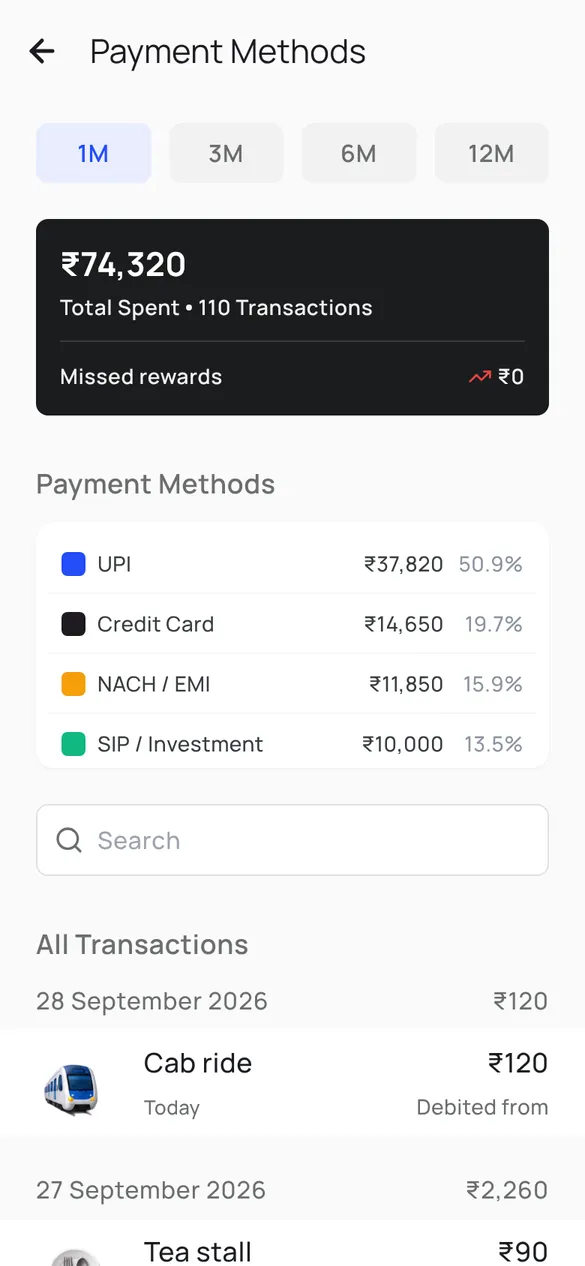
    Unyfy payment methods screen showing the month's spending split across UPI, credit card, NACH EMI and SIP debits

    1.Spends by payment method

    UPI, card, NACH and SIP debits side by side, with each one's share of the month.

    Screens from the Unyfy app with sample data for a sample user, not the example on this page.

    Common questions

    Can I track GPay, PhonePe and Paytm spending in one place?

    Yes, if the tracker reads your bank's alerts rather than a payment app's history. A UPI payment made through GPay, PhonePe, Paytm or any other UPI app leaves the same bank account, and the bank sends its own SMS and email alert for each debit. A tracker that reads those alerts sees every payment in one list, whichever app you used. A payment app's own history only shows the payments made through that app.

    How do I see all my UPI transactions across different apps in one place?

    The bank statement is the complete record, because every UPI debit from every app settles through the same account; export a month, filter for UPI, sort by amount. The faster route is the bank's own SMS and email alerts, sent for every debit whatever app initiated it. Any single payment app's history is not enough: in a 55/35/10 split across three apps it shows ₹8,910 of a real ₹16,200.

    Why do UPI merchant names in my bank statement look like codes?

    The statement records the counterparty's virtual payment address or registered entity name, not the shop sign. In a typical month perhaps 36 of 90 UPI rows are recognisable on sight. The fix is a lookup that maps addresses to names, which automatic trackers maintain and which you can build yourself for your twenty most frequent addresses.

    Does a UPI expense tracker need my UPI PIN?

    No, and one that asks should be declined. The PIN authorises payments. Tracking reads payments after they happen, from the bank's SMS and email alerts, and reading an alert needs no PIN, no bank password and no linked login. A tool that needs the PIN to show you a chart is asking for a capability the job does not require.

    Is manually logging UPI payments in a spreadsheet worth it?

    It works for as long as you do it, and the arithmetic says how long that is. Ninety payments at twenty seconds is 30 minutes a month, 360 minutes a year, across 90 interruptions. It names everything and sees every app, but most people stop in the first busy week. If you try it, log one full month and keep the list as a benchmark to check any automatic tracker against.

    How much can I actually save by tracking UPI spending?

    Tracking saves nothing by itself; it shows where a decision is available. In the illustrative household, four AutoPay mandates of ₹149, ₹199, ₹299 and ₹99 are ₹746 a month, ₹8,952 a year; a ₹60 payment twice a working day is ₹2,640 a month, ₹31,680 a year. A ten percent change in ₹16,200 of UPI spend is ₹1,620 a month, ₹19,440 a year. Your figure comes from your own three lists.

    UPI spending is hard to track because of arithmetic, not character. Ninety payments averaging ₹180 are ₹16,200, and the 80 smallest, the ones nobody remembers, are ₹9,700 of it. A method that relies on you noticing a payment covers the ₹6,500 you would have known anyway. The bank's own alerts cover all 90, which is why automatic capture from those alerts is the one method that sees the money the others miss, provided it needs no PIN, sees every app and names most of what it sees. Then read three things: the ten largest, the mandates, and the small payment that repeats. That is where a ₹1,620 a month change usually lives. Informational page, not financial advice. The household is illustrative, every figure is a round assumption to replace with your own statement, and your bank's records govern what actually left your account, not this page.

    Our Partners

    Banks and NBFCs we compare

    Unyfy compares offers from these lenders and earns a commission if you take one. The comparison is shown first, and it can tell you not to switch.

    HDFC Bank logo
    ICICI Bank logo
    Axis Bank
    State Bank of India logo
    IDFC First Bank logo
    Kotak Mahindra logo
    IndusInd Bank logo
    Yes Bank logo
    Bajaj Finserv logo
    Tata Capital logo